


Android App Development in Melbourne
Introduction
In this article, will provide a comprehensive overview of Android app development. Firstly we will outline the main reasons to target the Android environment.
We will also provide a background of the Android platform and the technologies that are involved.
App development in Android is not without its challenges. The challenges are highlighted. More importantly, it will highlight how the challenges can be overcome.
Why Android App Development?
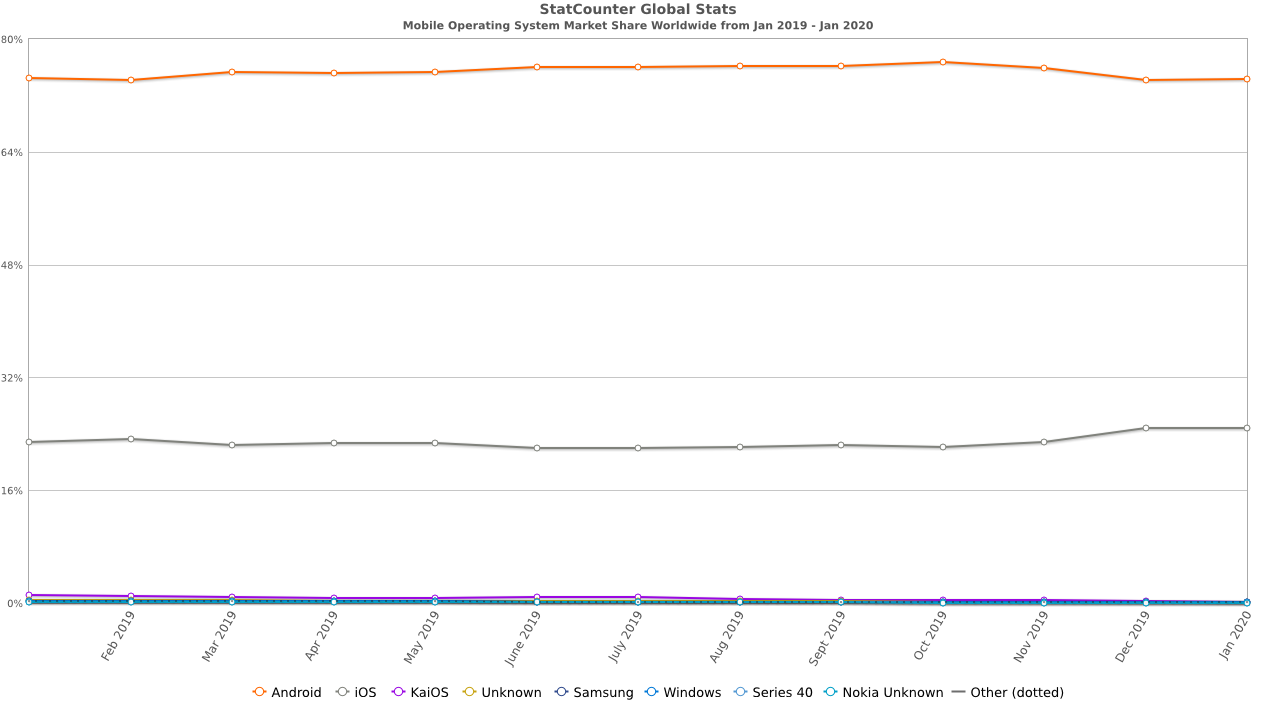
Android has greater market share worldwide
As shown in the graph below from statcounter, Android dominates the worldwide mobile operating market. In January 2020, Android had a 74.3% worldwide market share.
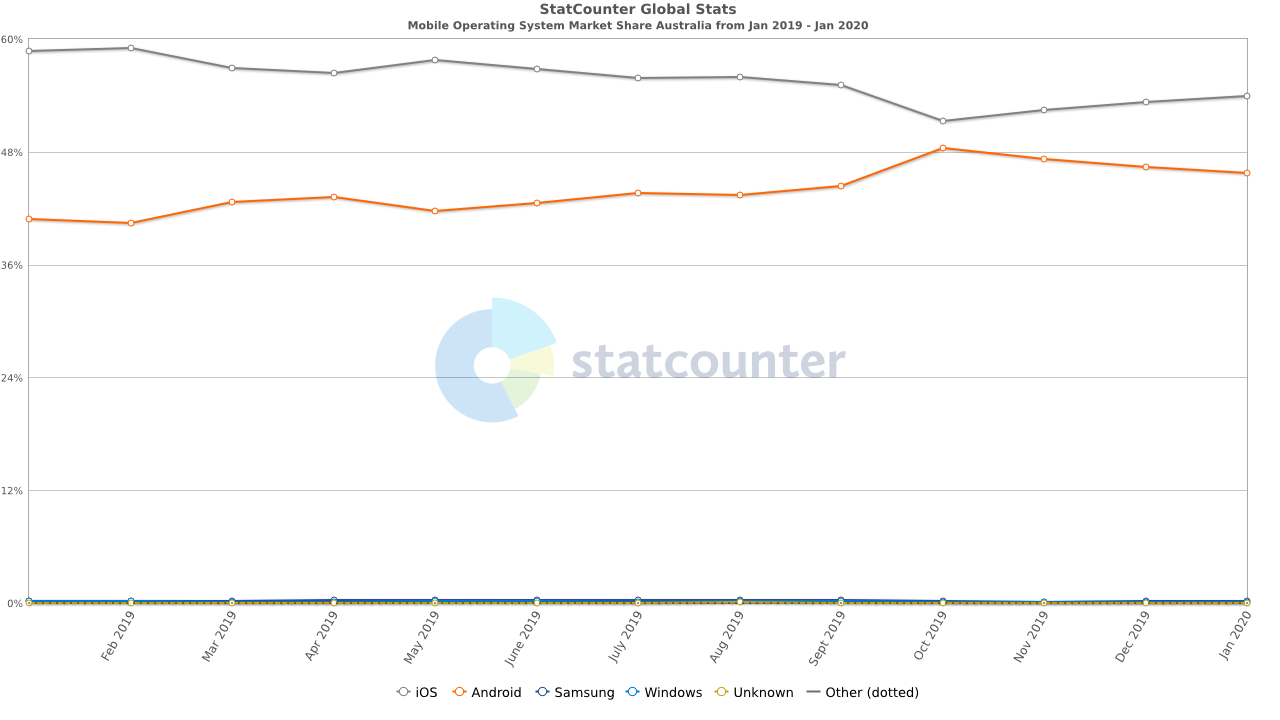
More downloads on Android
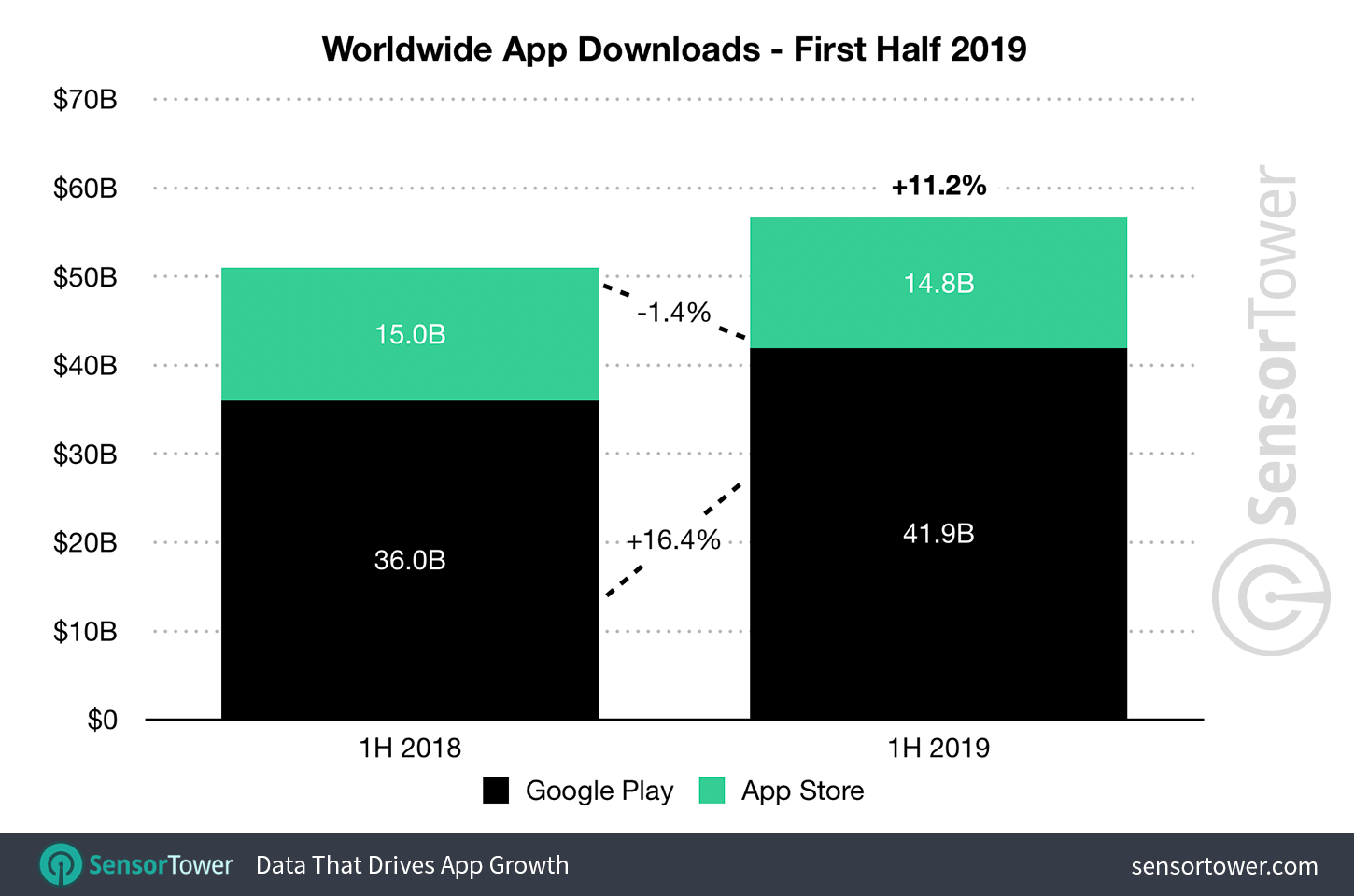
The graph below shows that Android app downloads had 41.9 billion downloads while iOS only managed 14.8 billion.
In addition, Android apps grew by 16.4% while iOS decreased by 1.4%. The dominance of Android devices worldwide also translates to app downloads.
The market share of Android makes it clear that you will need to target the Android environment at some point.
Before we go any further, it’s useful to get an understanding of what Android is.
What is the Android operating system?
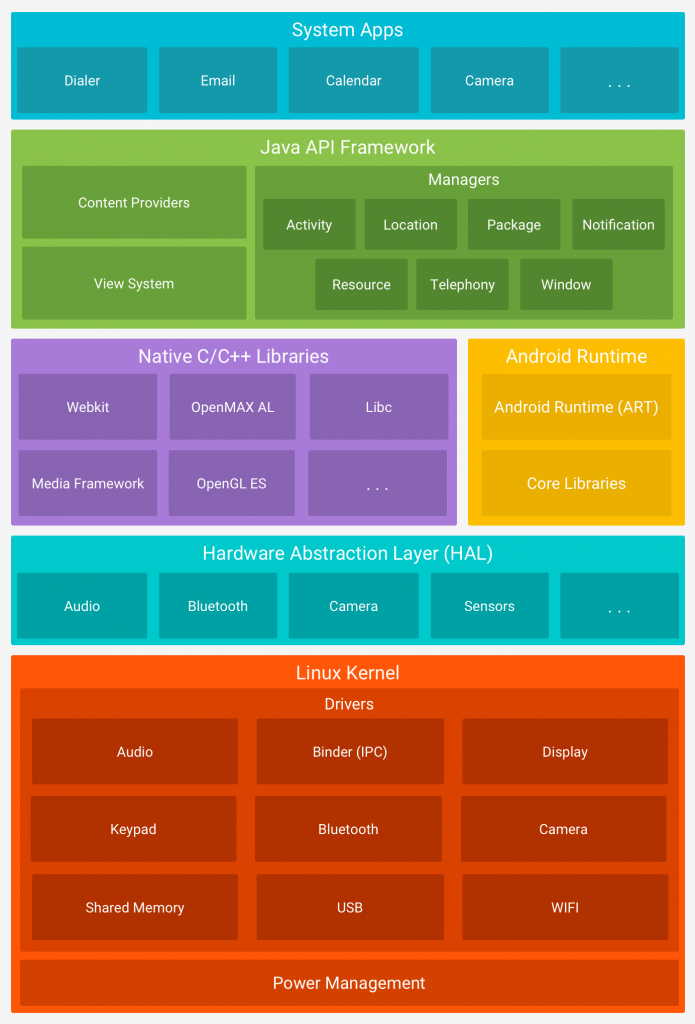
Based on the Linux kernal
As shown in the Android software stack, it is an operating system based on the Linux kernal.
Each app runs on its own instance of the Android Runtime (ART) that is similar to a Java Virtual Machine (JVM). It has been optimised to run bytecode for the Android OS.
Features of the Android operating system are available through the Java API Framework. Apps have access to the same APIs that the System Apps use.
The API itself has been written in the Java language. It exposes all services of the OS that are available through the Hardware Abstraction Layer (HAL).
For example, the Java API it can provide access to the camera or bluetooth modules in the Hardware Abstraction Layer.
History of the Android OS
Android was originally developed by Android Inc which was acquired by Google in 2005.
Since 2007, Android is developed by the by the Open Handset Alliance that comprises of 84 companies.
However, Google leads this development. At regular intervals, Google releases new versions into the Android Open Source Project.
As Android is open source, handset manufacturers extend the code themselves. Extensions to the pure Android OS by handset manufacturers does cause issues that we will discuss later.
How to development apps in Android?
Which Android development environment?
The official integrated development environment (IDE) for Android is Android Studio.
It has many features such as:
- Visual layout editor that allows you to construct the visual elements of app quickly.
- Intelligent code editor that supports type ahead for Java, Kotlin, C & C++.
- Fast emulator that allows you to deploy your app and on a real device and test it.
- Real time profiler that helps to monitor the performance of your app.
- Build system that facilitates automating the build the process.
- Tools that allow you to minimise the size of your app and thus improving its performance.
It is important to note that depending upon the language you use for Android app development, many other development environments could be used.
You could develop an app without any IDE by editing code files and using the command line tools to test and build the app. However, this may not be as productive as using an IDE.
As alluded to above, you can develop Android apps in a number of different languages.
Which language for Android development?
Java
As outlined in the Android software stack above, Java is leveraged heavily in the operating system. The Java API is written in Java itself.
Therefore, Android’s first official language is Java. Java is a statically typed, object oriented language. Although created in 1991, it remains as the most popular programming language in the world..
The Java source code is compiled to an optimised bytecode specifically for Android called DEX Bytecode.
Kotlin
Android Studio provided first class support to the Kotlin programming language since version 3 that was released in 2017.
Kotlin is a modern, statically typed language that was designed to boost productivity. Writing less ‘boilerplate code’ means less programming effort and better maintainability.
The added benefit of Kotlin is that it 100% interoperable with the Java. This means that you can choose to write your app in Kotlin and Java. This allows you to migrate your apps to Kotlin in a gradual manner.
Leading Apps such as Zomato are experiencing significant reductions in code and improvements in developer productivity.
C/C++
There are rare instances where you may need to access hardware components directly. This could be to obtain the highest performance required from compute intensive apps such as games.
If this is required, then you can code some components in C or C++ using the Native Development Kit (NDK).
Using other languages for app development
Other languages can also be used for Android app development. As highlighted above, Android apps execute in an instance of the Android Runtime (ART). Other languages compile their source code to the DEX byte code that can then run in the Android environment.
For example, according to Tiobe, Python is the third most popular language after Java and C.
Numerous tools are available such as Bee Ware and Kivy that allow you to code your app in Python.
This is just one example. There are many other options available to code your Android app in a different language.
Challenges with Android development
Security Issues
Vulnerabilities from the operating system
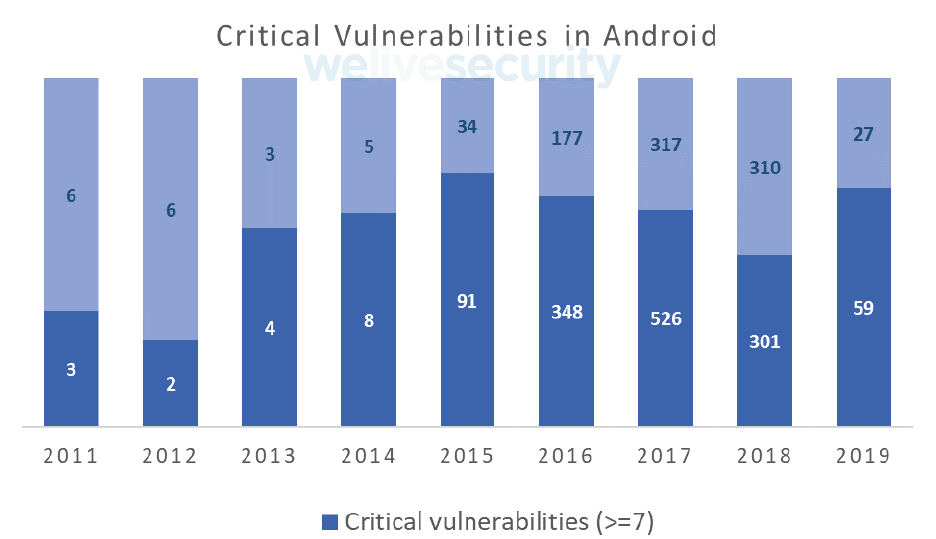
Security attacks targeting mobile devices have risen by 50% from the prior year. A significant number of these attacks are targeted at the Android platform. The graph below illustrates the number of critical vulnerabilities in Android since 2011.
Although the absolute number of security vulnerabilities is less than the three prior years, 68% were deemed critical. Of the critical vulnerabilities, 29% allowed malicious code to be executed.
Vulnerabilities from apps
In addition to the vulnerabilities in the operating system, vulnerabilities are also introduced through apps deployed in Google Play.
A study found that 43% of Android apps and 38% of iOS apps had high risk vulnerabilities.
These vulnerabilities could allow malware to intercept sensitive data. Most of the time, these vulnerabilities have been introduced accidentally by the app developer.
However, there are instances where apps with malicious intent are in Google Play. An example of this is the Currency Converter and BatterySaverMobi apps.
They would only engage when the sensor data showed the handset was being used. The user would be shown a fake ‘system update’ message. If the user agreed to fake system update, then a Trojan would be installed.
The Trojan could record covertly record key strokes or take screenshots. This is a popular mechanism to steal Internet Banking credentials.
It could also access other parts of handset without the users knowledge such as recording audio, send SMS, etc.
Solution to the security issue
When building an Android app, security must be considered from the ground up and from multiple angles.
Security ‘checkpoints’ should be incorporated at all stages from app design, development to testing.
What is Android fragmentation?
The main reason why you want to target the Android environment is the sheer number of Android devices. There are over 2.5 billion active Android devices across 180 hardware manufacturers.
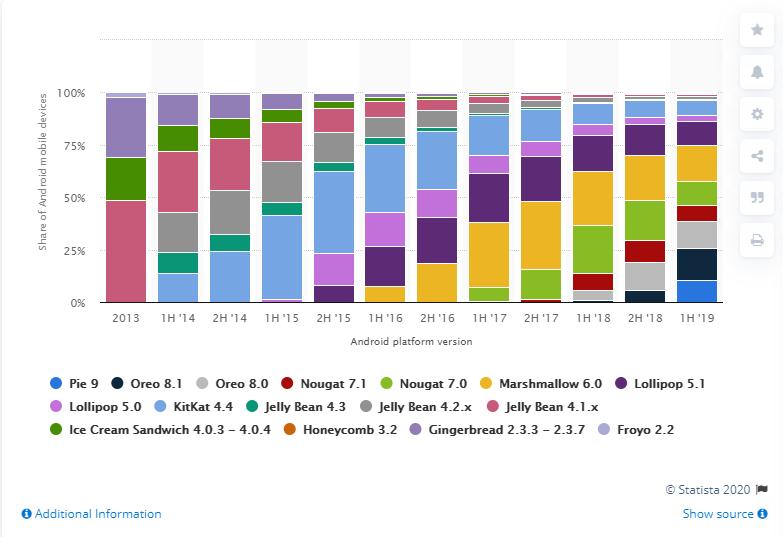
The involvement of some many manufacturers is a key reason of the significant fragmentation of Android versions. This is because as specified above Android is an open source operating system.
Most handset manufacturers modify the core Android code before they ship it. This causes a significant delay in shipping an update to the existing handsets. Users may also delay the upgrade even when the latest version of Android is available.
This makes it extremely challenging when developing apps. You need to cater for different versions of Android.
You need to consider the different functionality and features for each version. Where a feature is not available, your app needs to gracefully handle this situation.
New handsets not sold with current version of Android
One would assume that all new Android devices are shipped with the current version of Android. You could then target your app strategy accordingly.
However, the latest handsets may not be shipped with the current version of Android. Even if you are targeting a user base that has the latest hardware, they may still have different versions of the OS.
As many manufacturers modify the core Android code themselves, there is a time lag. The latest version of Android may be released, but the manufacturer than adds their own extensions to the code. This time lag can be significant.
This graph highlights the percentage of handsets each manufacturer ships with the latest version of Android.
Nokia is a clear leader with 96% of their handsets being sold with the latest version of Android. This is closely followed by Samsung at 89%, Xiaomi at 84% and Huawei at 82%.
However, most other handset manufacturers lag behind significantly with the next closest manufacturer being Lenovo at only 43%.
Even with new hardware, there is a significant variation on Android versions.